On-Page SEO Checklist: 13 Things I Fix on Every Page
Most pages I audit don’t have a content problem. They have a packaging problem. The information is on the page, but the title tag is vague, the H1 says something different, the images are called IMG_4471.jpg and no other page on the site links to it. Google has to guess what the page is for, and AI tools like ChatGPT and Google’s AI Overviews usually skip it.
I’m Irfan Ghaffar. I do local SEO and ecommerce SEO for small businesses, and on-page work is the first thing I fix on every project because it’s the part the owner fully controls. No outreach, no waiting on other websites.
This is the on-page SEO checklist I actually use. I’ll show each item on a live post from my own site, so you can see what it looks like on a real page and not just in a list.
Quick answer: what is on-page SEO?
On-page SEO is everything you change on the page itself so search engines and AI tools understand it and people want to click it: the title tag, meta description, URL, headings, body content, internal links, images, structured data and page experience. Off-page SEO happens on other websites (links, mentions, reviews). Technical SEO is how the whole site gets crawled, rendered and indexed.
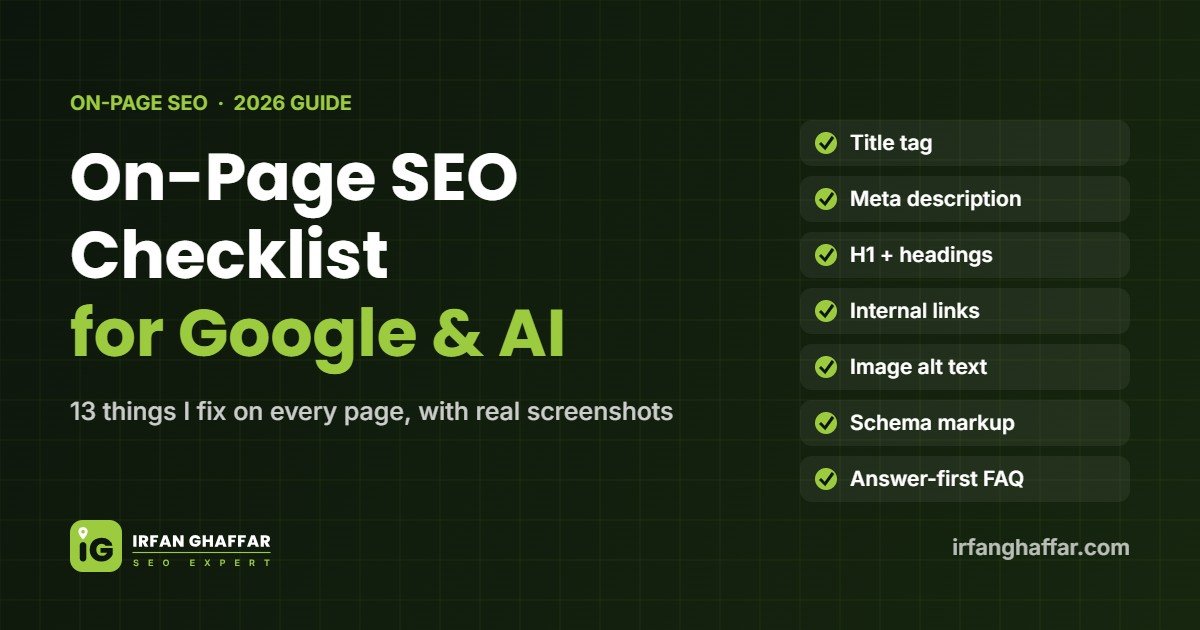
The on-page SEO checklist at a glance
- Match the search intent
- Write a title tag that earns the click
- Write a meta description that sells the visit
- Keep the URL short and readable
- Use one H1 and a clean heading outline
- Cover the topic and its entities
- Show who wrote the page
- Add internal links with descriptive anchors
- Link out to one strong source
- Name and describe every image
- Add schema markup that matches the page
- Structure answers for AI search
- Check speed and the mobile layout
1. Match the search intent before you touch anything else
Search intent is the reason behind the search. Someone typing “plumber in New York” wants to call a plumber today. Someone typing “how to fix a leaking tap” wants steps. If your page is a service page and Google is ranking guides for that keyword, no amount of on-page work will fix it.
My check is simple. I search the keyword from the target location and look at the top 10. Are they service pages, blog posts, product pages or directories? Whatever format dominates is the format I build. I explain how I read the live results in my guide to low competition keywords.
For local businesses, intent also decides the page type. For a “near me” or “service in city” keyword, I build a dedicated service page with the city in it, not a blog post.
2. Write a title tag that earns the click
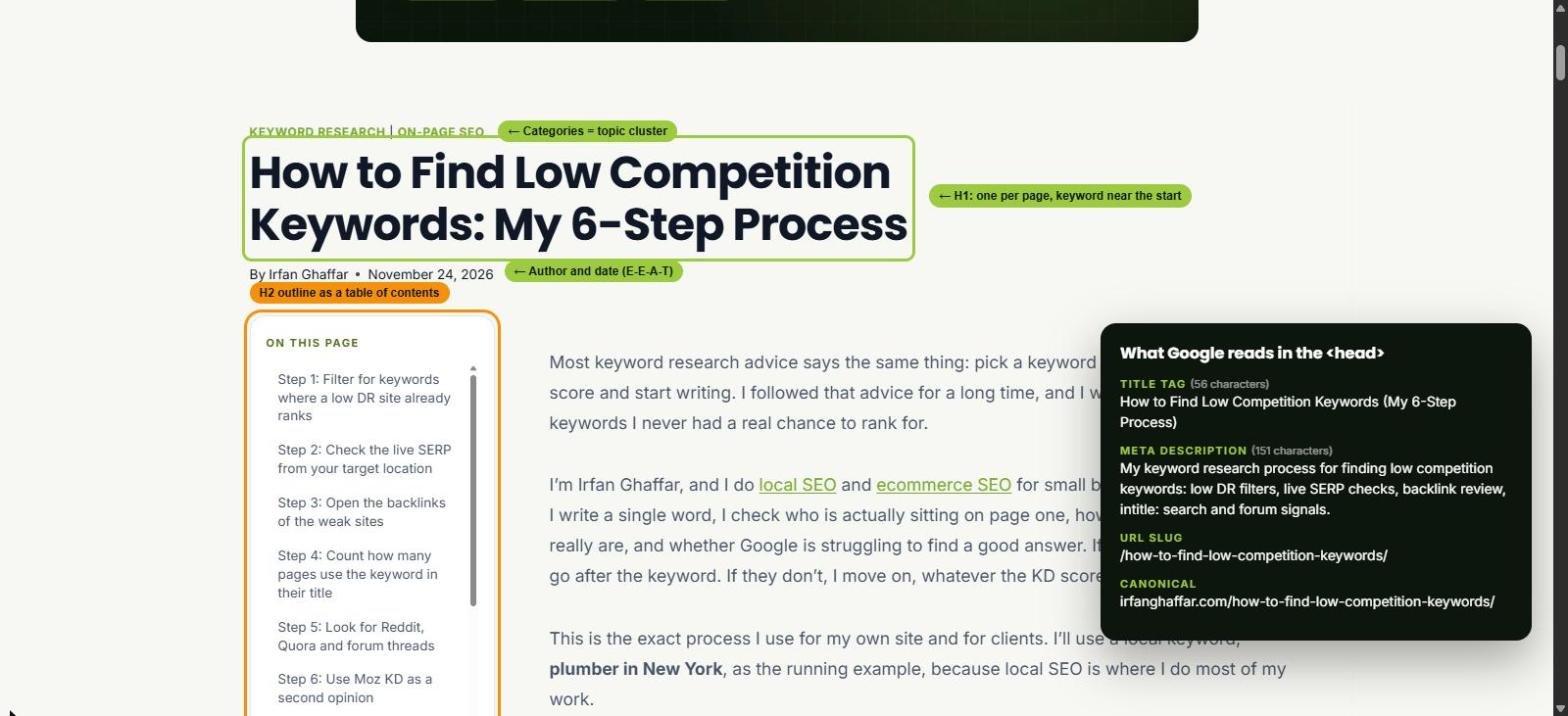
The title tag is the blue headline in Google’s results and usually the first thing an AI tool reads about your page. It’s still one of the strongest on-page signals you control.
- Put the main keyword near the start. “How to Find Low Competition Keywords” leads the title in the screenshot above.
- Keep it around 50 to 60 characters so it doesn’t get cut on mobile. Mine is 56.
- Add a reason to click: a number, a year, a location or a result. “(My 6-Step Process)” tells people what they get.
- Make every title on the site unique. Duplicate titles are one of the most common problems I find in audits.
Google can rewrite your title if it thinks it doesn’t describe the page well. When that happens, it often pulls from the H1 or from links pointing at the page, which is another reason those should agree with each other.
3. Write a meta description that sells the visit
The meta description isn’t a ranking factor, but it affects whether people click. Think of it as a short ad for the page. In the screenshot, mine is 151 characters and lists exactly what the reader will learn.
I keep descriptions around 140 to 160 characters, mention the keyword once (Google bolds matching words), and write them for a person. Google will sometimes show a different snippet taken from the page itself, usually when the search is more specific than your description. That’s fine. A clear description still wins most of the time.
One thing you can skip: the meta keywords tag. Google has said plainly that it doesn’t use it.
4. Keep the URL short and readable
A good URL tells people what the page is about before they open it. Compare /how-to-find-low-competition-keywords/ with /p=1210 or /blog/2026/11/24/post-final-v2/. The first one reads like a label.
- Use the main keyword, and drop filler words like “the”, “a” and “and” where you can.
- Use hyphens and lowercase letters, and leave dates out (they make good content look old).
- Don’t change the URL of a page that already ranks. If you must, set up a 301 redirect.
- For local service pages, a structure like /services/plumbing/brooklyn/ keeps things organised.
5. Use one H1 and a clean heading outline
The H1 is the visible title on the page. I use one per page, keep it close to the title tag and put the keyword near the start. In the screenshot, the H1 and the title tag say the same thing in slightly different words, and that’s on purpose.
Under the H1, the H2s are the chapters of the page. Google says the order of headings doesn’t matter for ranking, and I agree. I still take them seriously, because they’re what readers scan and what AI tools use to split a page into answerable chunks. On my posts, the H2s build the “On this page” table of contents you see on the left.
My test: if someone reads only the H2s, do they understand the whole page? If not, the headings are too vague. “Step 3: Open the backlinks of the weak sites” passes. “More information” fails.
6. Cover the topic and its entities, not a keyword density
This is where I see the most outdated advice. A recent thread on r/localseo told people to use one focus keyword per page at 6 to 10 percent density. On a 1,500 word page, that’s 90 to 150 uses of the same phrase. It reads terribly, and Google’s spam policies name keyword stuffing directly.
What I do instead:
- Use the main keyword in the title, H1, first 100 words and one or two H2s. After that, write naturally.
- Cover the entities that belong to the topic. For on-page SEO, that means title tags, meta descriptions, canonical tags, schema markup, alt text, Core Web Vitals and search intent. If every top page explains something and yours doesn’t, you have a gap.
- Answer the questions people really ask. I pull these from Reddit, Quora and People Also Ask, the same way I describe in my content research process.
- Add something the other pages don’t have: your own numbers, screenshots, a client example or a clear opinion. This is called information gain, and it’s the main reason a page deserves to rank.
7. Show who wrote the page (E-E-A-T)
E-E-A-T stands for experience, expertise, authoritativeness and trust. It isn’t one ranking factor you can switch on, but Google’s quality guidelines lean on it, and it matters most for pages about health, money or safety. Clinic websites feel this more than anyone.
On every post, I show:
- A real author name and date under the H1 (labelled in the first screenshot).
- An author box at the end with a photo, a short bio, real numbers and a link to the about page.
- First-hand proof: screenshots from my own tools, client results, and what went wrong, not just what went right.
- Person schema that ties the author to the site and their social profiles.
For a business website, trust also comes from the boring stuff: a real address, phone number, reviews, a privacy policy and a contact page that works. My Sydney clinic case study shows how much of a local win comes from these signals.
8. Add internal links with descriptive anchors
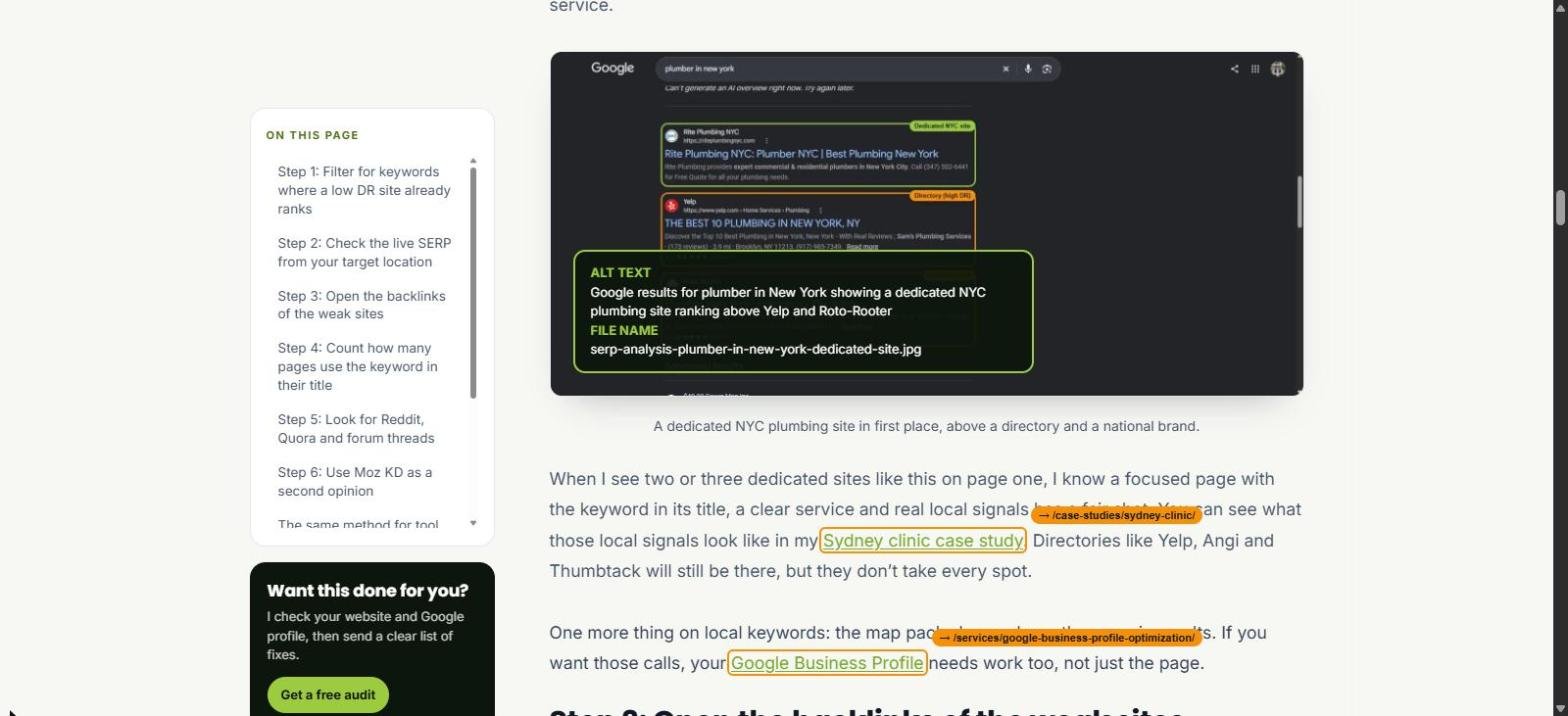
Internal links are how Google finds your pages, understands how they relate and decides which ones matter most. They’re also the cheapest SEO win there is, because you don’t need anyone’s permission.
- Use short, descriptive anchors. “Sydney clinic case study” and “Google Business Profile” tell Google exactly what’s on the other side. “Click here” tells it nothing.
- Link from new posts to your money pages (services, products, case studies), and from older posts to new ones.
- Link where it helps the reader, not in a block of 20 links at the bottom.
- Make sure no important page is an orphan with zero internal links pointing to it.
Internal linking is its own job in every technical SEO audit I do, because it’s usually where the quickest gains are.
9. Link out to one strong source
Linking to other websites doesn’t hurt you. One well-chosen link to an authority source shows readers where your claims come from and helps Google place your page in the right topic. For this article, my main source is Google’s own SEO Starter Guide, which covers most of the basics above in Google’s words.
Pick the original source, not a blog that copied it. Official documentation, government sites, research papers and well-known industry tools are all good choices. For anything paid, add rel="sponsored".
10. Name and describe every image
Google reads images better than it used to, but alt text and file names are still how you tell it what an image shows. Screen readers read alt text aloud too, so it’s an accessibility issue as well.
- Rename files before upload: serp-analysis-plumber-in-new-york-dedicated-site.jpg instead of Screenshot_2026-11-20.png.
- Write alt text that describes the image in one sentence, with the keyword only if it fits naturally.
- Add captions under screenshots and charts. People read captions more than body text.
- Compress images and set width and height so the layout doesn’t jump while loading.
Original images matter more now. A stock photo adds nothing a reader hasn’t seen before. A screenshot from your own tool or a chart of your own data is something only you can give.
11. Add schema markup that matches the page
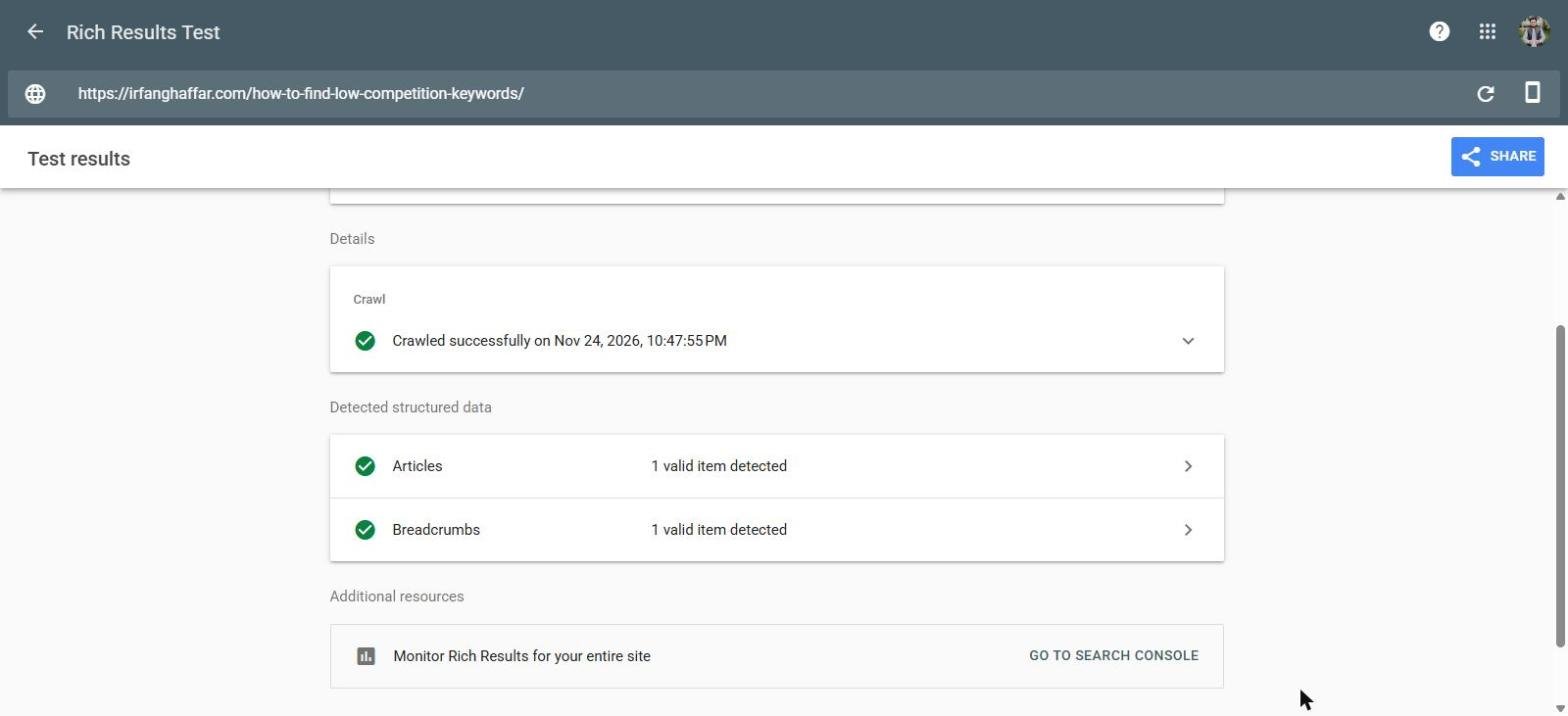
Schema markup is code that labels your content for search engines: this is an article, this is the author, this is the business, these are the questions and answers. It doesn’t raise rankings by itself, but valid markup makes a page eligible for richer results and easier for Google and AI systems to understand.
What I add, depending on the page:
- Article or BlogPosting for posts, with author, dates and image.
- BreadcrumbList so Google can show the site structure in results.
- Person for the author, linked to their social profiles.
- LocalBusiness on the homepage or contact page of a local business, with name, address, phone, hours and service area.
- Service on service pages, and Product with price and reviews on ecommerce product pages.
- FAQPage where there’s a real FAQ section on the page.
Two honest notes. First, Google now shows FAQ rich results only for a small group of authoritative government and health sites, and it stopped showing HowTo rich results in 2023. I still add FAQ markup because it describes the page clearly, but I don’t promise clients the dropdowns. Second, markup must match what’s visible on the page. Fake reviews, or a LocalBusiness block pasted onto a blog post, can lead to a manual action.
After publishing, I test every page in the Rich Results Test and the Schema Markup Validator, like in the screenshot.
12. Structure answers so AI tools can quote them
More of my clients now ask how to show up in ChatGPT, Perplexity, Gemini and Google’s AI Overviews. People call this AIO, GEO or AEO. The good news is that most of it is solid on-page SEO done properly.
- Answer first. Put a direct, two to three sentence answer right under the heading, then explain. The quick answer box at the top of this post is an example.
- Keep one idea per section, so each H2 still makes sense when it’s lifted out on its own.
- Use lists, steps and tables when the content really is a list, steps or a comparison.
- Use real names and numbers: tools, places, prices, dates. AI answers prefer specifics they can attribute.
- Keep your facts consistent across your site, Google Business Profile and social profiles, so models don’t get mixed signals about who you are.
If AI visibility is a priority, my AI search visibility service goes further, with brand mentions and entity work across the web.
13. Check speed and the mobile layout
Page experience is more of a tie-breaker than a magic ranking factor, but slow, jumpy pages lose visitors before they read anything. I check Core Web Vitals in PageSpeed Insights and Search Console: LCP (how fast the main content loads), INP (how fast the page reacts to taps) and CLS (how much the layout moves).
Then I open the page on my own phone. Is the text readable? Are buttons easy to tap? Does a pop-up cover the content? In my PageSpeed case study, fixing these on a heavy Elementor site made a clear difference.
Problems I keep seeing on Reddit and Quora (and what fixes them)
I read SEO threads every week because they show me where people get stuck. These five questions come up again and again.
“My page is perfectly optimized but still doesn’t rank”
One Quora question on this has more than 45 answers, and most say the same thing: on-page SEO gets you into the race, it doesn’t win it. If every page in the top 10 sits on a strong domain with hundreds of links, a perfect title tag won’t move you past them. Check the competition first, pick keywords you can win, then build off-page signals like links and local citations.
“Rank Math says 90/100, so why am I on page 5?”
Plugin scores are checklists. They check whether the keyword is in the title, URL and first paragraph. They can’t judge whether your content is better than the top results, whether the intent matches or whether anyone links to you. I use them as a reminder list, nothing more.
“How many times should I use my keyword?”
There’s no correct number. Use it where it naturally belongs (title, H1, intro, a heading or two), then write for the reader. If a paragraph sounds odd when you read it out loud, you’ve used it too much.
“My page is indexed but not ranking”
It’s usually one of four things: the intent doesn’t match, the page is thinner than what already ranks, another page on your own site targets the same keyword, or nothing links to it. I check them in that order.
“On-page or off-page: which matters more?”
Do on-page first, because it’s free, you control it, and links pointing to a weak page are wasted. Then do off-page. For local businesses, add the Google Business Profile, because the map pack has its own ranking system.
Frequently asked questions
What should an on-page SEO checklist include?
Search intent, title tag, meta description, URL, one H1 with clear H2s, natural keyword use and entity coverage, author and trust signals, internal links, one strong external source, image file names and alt text, schema markup, answer-first structure for AI search, and speed and mobile checks.
What is the difference between on-page, off-page and technical SEO?
On-page SEO is what you change on a page itself, like titles, headings, content, links and schema. Off-page SEO happens on other websites: backlinks, brand mentions, reviews and citations. Technical SEO covers how the whole site is crawled, rendered and indexed, such as sitemaps, robots.txt, redirects and speed.
How long should a title tag and meta description be?
Aim for about 50 to 60 characters for a title tag and 140 to 160 characters for a meta description. Google has no fixed limit, but longer text often gets cut off in the results.
How many times should I use my focus keyword?
There is no ideal number or density. Use it in the title, H1, first 100 words and one or two headings, then write naturally and cover related topics. Keyword stuffing is against Google’s spam policies.
Does schema markup improve rankings?
Not directly. Valid schema helps search engines and AI tools understand a page and can make it eligible for rich results. It must match what is visible on the page.
How do I optimize a page for AI Overviews and ChatGPT?
Answer the question directly under each heading, keep one idea per section, use lists and specific facts, show a real author, add schema and keep your business details consistent across the web. Strong traditional SEO is still the base.
Why is my optimized page still not ranking?
Usually the competition is stronger, the intent does not match, the page adds nothing new, or it has few internal and external links. On-page SEO is necessary, but on its own it is not enough for competitive keywords.
Want me to check your pages?
Send me your website and I’ll run your most important pages through this checklist. You’ll get a clear list of what to fix first, in plain English, with no obligation.